MindTheCheck is pleased to announce the first Set Of Matches event!
Users will be able to register starting from May 21th and the event remains open for registration till June 10th.
The first SoM consists of up to 4 unrated turn-based chess games each player and it is a way to meet people on the virtual board and exploit the MindTheCheck features like the post-game analysis.
Unrated chess games do not alter the player ELO rating so people are free to play without worry too much about mistakes.
Turn-based games have very large time constraint (30 days timeout each move) so it gives players enough time to play a good game.
So, have nice games with MtC events!

Showing posts with label post-game analysis. Show all posts
Showing posts with label post-game analysis. Show all posts
Wednesday, April 10, 2013

Sunday, January 27, 2013
Post-game analysis room
Mind The Check has recently released the new feature "post-game analysis", with which it is possible to comment on a game in real time with your opponent or anyone who wants to participate in the analysis.
It is a tool that aims to be a sort of chat at the board where, instead of words, the participants exchange moves, variations, lines of play, evaluations of positions and moves. Born to permit the player to review the game with the opponent which I consider an important moment in the noble Game, share those important moments that were crucial to the outcome of the game or are simply considered relevant.
How to access post-game analysis?
Only registered users can benefit of the post-match and only the players in a game, as owners of it, they can open a table of analysis on their game. Once opened, any registered user can intervene and eventually contribute.
You can access the analysis area in three ways:
Two players have just finished a game (for the sake of example the game follows a famous game between Richard Reti (2675) and Savielly Tartakower (2625), Vienna, 1910), black has abandoned and the button "Analyze" appears on top of the board.

When you click "Analyze" you go in another view, the analysis room, which contains a main board on the left, the list of moves int the center, navigation keys and controls to enter the comments that you want to match are just on bottom. On the right there is an empty space to contain diagrams of the lines other participant are analysing.
One can navigate between the moves in two ways:
Assume you select Qd3 and add annotation to this move. The evaluation will be translated into symbolic form corresponding to the Numerical Annotation Glyph (NAG) and included in the list of moves.
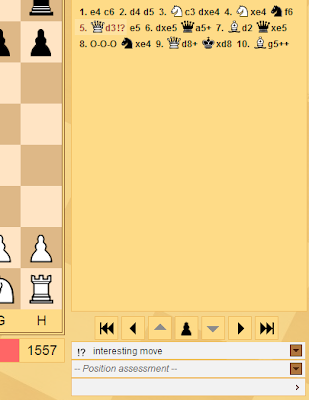
To add a text comment to the final move, you must enter the text in the editable text box and click the small arrow to the right.
To add a variant (in the example in place of 8 .... Cxe4), just move from a given position (8. 0-0-0) and the variant is created automatically.
How to interact with other participants?
Each time a participant wants to "see" or create a different line from what you are analyzing, in the right area you will see a diagram with their line of interest. If more participants are annotating the game at the same time, you'll see a set of diagrams on the right, one for each participant: if you want to follow the line of one of them just "click" on the diagram and "watch" on the main board about the evolution of this line and then break away when you want, by moving or positioning yourself on another existing position.

There is no way to chat between participants because the goal here is the analysis: you discuss about the game in front of the board and the language is mainly the NAG.
This mode of interaction has no matches in the other online gaming sites even if I found some similarities but the purpose is very different. Mind The check seeks to share the analysis and manage the analysis at the same time creating a collaboration tool for chess players.
I hope I have done something pleasant to the players,
Good Game!
It is a tool that aims to be a sort of chat at the board where, instead of words, the participants exchange moves, variations, lines of play, evaluations of positions and moves. Born to permit the player to review the game with the opponent which I consider an important moment in the noble Game, share those important moments that were crucial to the outcome of the game or are simply considered relevant.
How to access post-game analysis?
Only registered users can benefit of the post-match and only the players in a game, as owners of it, they can open a table of analysis on their game. Once opened, any registered user can intervene and eventually contribute.
You can access the analysis area in three ways:
- immediately on conclusion of a game, clicking the "Analyze" button;
- from the list of matches, clicking on "Play" and then clicking on "Analyze" button;
- from the list of matches, if a table of analysis has already been created, by clicking on the "Analyze" button;
Two players have just finished a game (for the sake of example the game follows a famous game between Richard Reti (2675) and Savielly Tartakower (2625), Vienna, 1910), black has abandoned and the button "Analyze" appears on top of the board.

Fig. 1 - The game is over and the button "Analyze" gets shown
When you click "Analyze" you go in another view, the analysis room, which contains a main board on the left, the list of moves int the center, navigation keys and controls to enter the comments that you want to match are just on bottom. On the right there is an empty space to contain diagrams of the lines other participant are analysing.
One can navigate between the moves in two ways:
- with the navigation keys (in the center of which a pawn can flip the board)
- by left-clicking with the mouse
Assume you select Qd3 and add annotation to this move. The evaluation will be translated into symbolic form corresponding to the Numerical Annotation Glyph (NAG) and included in the list of moves.
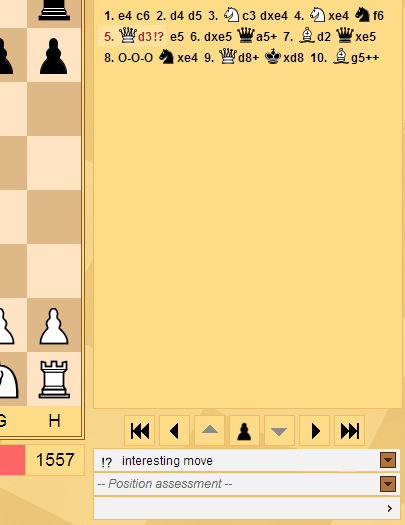
Fig. 2 - An evaluation of Qd3
To add a text comment to the final move, you must enter the text in the editable text box and click the small arrow to the right.
To add a variant (in the example in place of 8 .... Cxe4), just move from a given position (8. 0-0-0) and the variant is created automatically.
How to interact with other participants?
Each time a participant wants to "see" or create a different line from what you are analyzing, in the right area you will see a diagram with their line of interest. If more participants are annotating the game at the same time, you'll see a set of diagrams on the right, one for each participant: if you want to follow the line of one of them just "click" on the diagram and "watch" on the main board about the evolution of this line and then break away when you want, by moving or positioning yourself on another existing position.

Fig. 3 - 10. Nf3 under analysis, but two other partecipants are evaluating different positions
There is no way to chat between participants because the goal here is the analysis: you discuss about the game in front of the board and the language is mainly the NAG.
This mode of interaction has no matches in the other online gaming sites even if I found some similarities but the purpose is very different. Mind The check seeks to share the analysis and manage the analysis at the same time creating a collaboration tool for chess players.
I hope I have done something pleasant to the players,
Good Game!
Subscribe to:
Posts (Atom)